YouTube Download Only 360p or No Sound? Why It Happens
We listed every format of a 4K YouTube video: 37 were video-only and just 1, a 360p MP4, had sound. Why downloads drop to 360p or go silent, and the fix.
Phil Duong
Builds Vidtrimmer
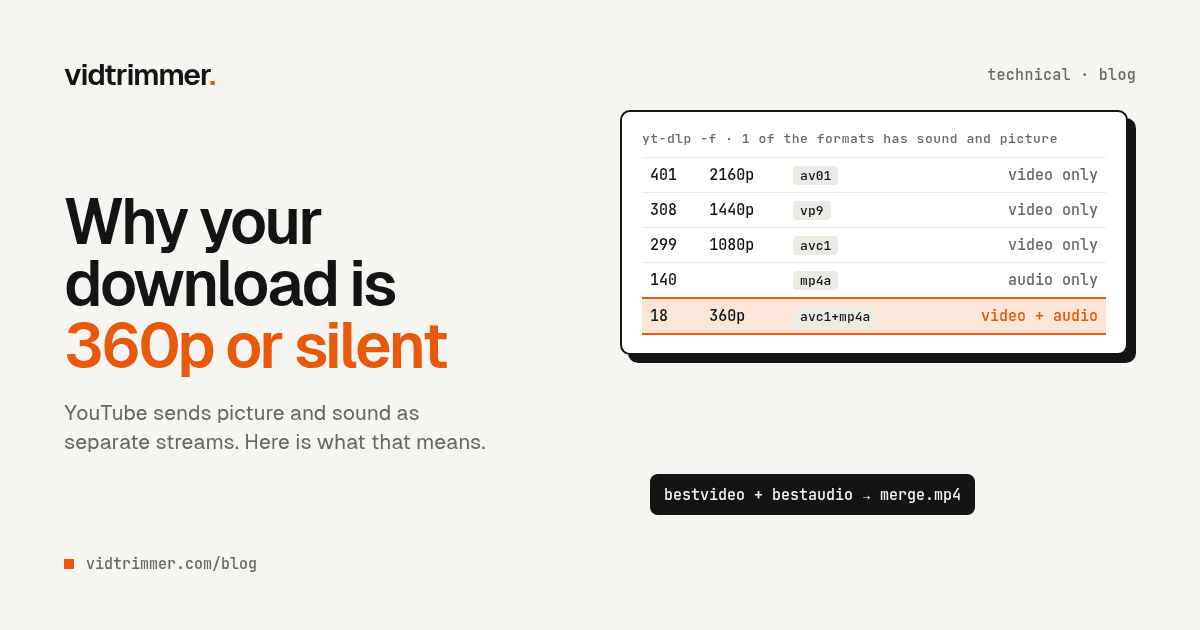
You paste a YouTube link into a downloader, pick the highest quality, and get a soft 640x360 file. Or you get a sharp 1080p file with no sound at all. Both problems have the same cause: above 360p, YouTube doesn't keep picture and sound in one file.
We checked this on a real upload. On October 11, 2026, we ran yt-dlp -F (yt-dlp nightly build 2026.08.17.073947) on "Big Buck Bunny 60fps 4K - Official Blender Foundation Short Film". We picked it because Big Buck Bunny is a Blender Foundation open movie, and the project's results are "licensed under the Creative Commons Attribution 3.0 license" (Big Buck Bunny: About). Anyone may share it with credit.
Of the 54 entries in its format list, exactly one had both picture and sound. Below is the data, why YouTube works this way, and the commands that get you 1080p or 4K with audio.
Key takeaways
- Our test 4K video listed 37 video-only formats, 12 audio-only formats, and one format with both: format 18, 640x360, H.264 with AAC.
- yt-dlp's README says that "if ffmpeg is unavailable", its default becomes
-f best/bestvideo+bestaudio(yt-dlp README). On our test video, that meant the 360p file.- 1440p and 4K came only as VP9 or AV1. For an MP4 that plays almost anywhere, take H.264 up to 1080p, or re-encode the 4K file once.
What we found in one 4K video's format list
The -F output for the Big Buck Bunny 4K upload had 54 entries: 4 storyboard image sets, 12 audio-only formats, 37 video-only formats, and 1 combined format. The combined one is format 18, a 640x360 MP4 with H.264 video and AAC audio, estimated at 27.21 MiB.
Everything sharper than 360p was video-only. The 37 video-only entries split into 12 H.264, 17 VP9, and 8 AV1 streams. Some are HLS copies of the same resolution, marked m3u8. The audio side is AAC in M4A and Opus in WebM, from 49k to 129k, and several tracks appear twice as "DRC" versions.
The table shows the directly downloadable (https) files at each size, with the sizes yt-dlp listed:
| Resolution | H.264 (MP4) | VP9 (WebM) | AV1 (MP4) |
|---|---|---|---|
| 360p, format 18 (with audio) | about 27.21 MiB | none | none |
| 360p | 17.45 MiB | 22.99 MiB | 14.59 MiB |
| 720p60 | 143.55 MiB | 107.46 MiB | 67.98 MiB |
| 1080p60 | 245.69 MiB | 160.92 MiB | 118.62 MiB |
| 1440p60 | not offered | 451.43 MiB | 298.08 MiB |
| 2160p60 | not offered | 1.27 GiB | 679.44 MiB |
Two things stand out. The best H.264 stream stops at 1080p60, so there's no H.264 file at 1440p or 4K at all. And at 2160p60 the AV1 file (format 401) is about half the size of the VP9 file (format 315). These sizes reflect the bitrates YouTube chose, so read them as download sizes, not as a codec quality benchmark.
Your list may look different. YouTube can serve different formats to different clients, and in our run yt-dlp warned that without a JavaScript runtime "some formats may be missing". Run yt-dlp -F on your own video before you assume anything.
Why does YouTube keep picture and sound apart?
Because it streams adaptively. MPEG-DASH breaks content "into a sequence of small segments", offered "at a variety of different bit rates", and the player picks the highest bit rate it can fetch in time (Wikipedia: Dynamic Adaptive Streaming over HTTP). The mp4_dash and webm_dash labels in our list mark those DASH streams.
Separate audio suits a streaming site. One audio track can serve all 8 video resolutions in our list, from 144p to 2160p. When your connection slows and the player switches from 1080p to 480p, it can keep the same audio stream and change only the video.
The cost lands on anyone who wants a normal file. Something has to fetch two streams and join them. That step is called merging, or muxing. It doesn't re-encode anything, it only puts both streams into one container, but the tool needs a program like ffmpeg to do it.
Why is my YouTube download only 360p?
Usually because the tool can't merge, so it takes the only file that already has sound. yt-dlp's README says its default is "generally equivalent to using -f bestvideo*+bestaudio/best", but "if ffmpeg is unavailable", the default becomes -f best/bestvideo+bestaudio (yt-dlp README). Here best means the best single file with both picture and sound. On our test video, that was format 18 at 360p.
We tested it directly. With ffmpeg hidden from yt-dlp, a simulated download (-s) of the Big Buck Bunny upload picked format 18 and printed: "ffmpeg not found. The downloaded format may not be the best available." With ffmpeg present, the same command picked format 401, the 2160p60 AV1 stream, plus format 251, Opus audio.
Simpler downloaders, browser extensions, and phone apps can hit the same wall for the same reason. If a tool offers 720p or 1080p but keeps handing you 360p, it probably can't merge streams.
The fix is to install ffmpeg. The README lists it as "Required for merging separate video and audio files" (yt-dlp README). The other route is a tool that does the merge on its own server.
Why does my YouTube download have no sound?
Because the tool saved a video-only stream and never added the audio. Every format above 360p in our list is video-only. yt-dlp reports the audio codec of format 299, the 1080p60 H.264 stream, as none. Save that stream on its own and you get a sharp, silent video.
The common ways it happens:
- You picked a format ID by hand.
yt-dlp -f 299downloads exactly that stream and nothing else. Ask for-f 299+140to add the AAC track. - The tool downloaded both streams but didn't join them. You end up with a silent video next to a separate audio file. Check the folder before you delete anything.
- A browser tool grabbed one request from the player. The player fetches video and audio separately, so a tool that captures a single request gets half the content.
yt-dlp's own default avoids this. Its README says the default selector is bv*+ba/b, which means "Download best format that contains video, and if it doesn't already have an audio stream, merge it with best audio-only format" (yt-dlp README).
Why does a 4K download come as WebM or AV1?
Because YouTube didn't offer H.264 above 1080p, at least on our test video. Its 1440p and 2160p versions existed only as VP9 (WebM, plus HLS copies) or AV1 (MP4). yt-dlp's format sorting ranks video codecs av01 > vp9.2 > vp9 > h265 > h264 (yt-dlp README), so a plain yt-dlp run picked AV1 video with Opus audio and planned a .webm file.
It's an MP4, so why won't it play?
MP4 is a container, not a codec. Format 401 is an .mp4 file with AV1 inside. The README's example to "Download the best mp4 video available" is -f "bv*[ext=mp4]+ba[ext=m4a]/b[ext=mp4] / bv*+ba/b". On our test video it picked exactly that: format 401 plus AAC audio (format 140), at 2160p. The extension says MP4, but a device without an AV1 decoder can't show the picture.
Which devices struggle with AV1 or VP9?
Mostly older ones, because AV1 hardware support is recent. Apple's A17 Pro chip in iPhone 15 Pro "includes a dedicated AV1 decoder" (Apple Newsroom), and the M3 media engine "now includes support for AV1 decode" (Apple Newsroom). Can I use marks Safari's AV1 support as partial from Safari 17, "only on devices with hardware decoder" (Can I use: AV1), and full WebM support only from Safari 16 and iOS Safari 17.4 (Can I use: WebM).
On Windows, Microsoft offers a free AV1 Video Extension that "helps video apps installed on Windows to play videos that have been encoded using the AV1 video coding standard" (Microsoft Store).
Editors are stricter than players. Final Cut Pro's list of supported video formats includes H.264 and HEVC, but VP9, AV1, and WebM aren't on it (Apple Support: Final Cut Pro). A file that plays fine in your browser can still fail on import.
Fix it yourself with yt-dlp
Install ffmpeg, update yt-dlp, and let its default selector merge the streams. Add -t mp4 when you need H.264. Update with yt-dlp -U, then look at what the video actually offers:
yt-dlp -F "https://www.youtube.com/watch?v=aqz-KE-bpKQ"For the best picture with sound, in whatever codec YouTube has:
yt-dlp -f "bv*+ba/b" "https://www.youtube.com/watch?v=aqz-KE-bpKQ"On our test video this chose 401+251, 2160p60 AV1 with Opus audio, saved as WebM. That's the best picture, with all the compatibility caveats above.
For an MP4 with H.264 and AAC that plays almost anywhere:
yt-dlp -t mp4 "https://www.youtube.com/watch?v=aqz-KE-bpKQ"The mp4 preset expands to --merge-output-format mp4 --remux-video mp4 -S vcodec:h264,lang,quality,res,fps,hdr:12,acodec:aac (yt-dlp README). Because the codec comes first in that sort, it picked 299+140 on our test video: 1080p60 H.264 with AAC, the highest H.264 resolution on offer. If your yt-dlp doesn't know -t, update it.
If yt-dlp stops and asks you to sign in, that's a separate problem with its own fixes, covered in Sign in to confirm you're not a bot. For a whole list of videos, see the bulk download guide. And we chose Big Buck Bunny because its license allows it. For other videos, read is it legal to download YouTube videos first.
Getting a 4K file that plays everywhere
If you need 1440p or 4K as H.264, you have to re-encode, because YouTube didn't offer that stream on our test video. Download the best version, then encode it once:
yt-dlp -f "bv*+ba/b" -o "bbb-4k.%(ext)s" "https://www.youtube.com/watch?v=aqz-KE-bpKQ"
ffmpeg -i bbb-4k.webm -c:v libx264 -crf 18 -preset medium -c:a aac bbb-4k-h264.mp4H.264 in MP4 is a safe target: YouTube's own upload guidance lists "Container: MP4" and "Video codec: H.264" (YouTube Help). HEVC (-c:v libx265) is the other option when you know the target device and editor support it.
Re-encoding has real costs. A merge only copies data, while a 4K60 encode decodes and compresses every frame again, so it takes far longer. The file will likely grow too. As a rough reference, YouTube's own 1080p60 H.264 stream is about twice the size of its AV1 stream at the same resolution (245.69 MiB against 118.62 MiB). And each encode loses a little detail. In our CRF test, CRF 18 scored 50.9 dB PSNR against the source, against 48.1 dB at libx264's default of 23, for a file about 60% larger. Encode once, from the best source, and keep the frame rate.
If you'd rather skip the setup, our 4K downloader does the download and the merge on the server. Vidtrimmer merges the picture and sound into one MP4 at the quality you pick, up to 4K. A full download without a trim keeps YouTube's own video stream, which at 4K is AV1, so the device caveats above still apply. When you trim a clip, it re-encodes that clip once to H.264 at CRF 18, a codec that editors such as Final Cut Pro import. If you only need one section of the video, the trim guide compares your options.
Questions
Why does my YouTube download only go up to 360p?
Because 360p is often the only YouTube format with picture and sound in one file. On the 4K Big Buck Bunny upload we tested, format 18 (640x360, H.264 with AAC) was the single combined format. A tool that can't merge separate streams, such as yt-dlp without ffmpeg, falls back to it.
Why does my 1080p YouTube download have no audio?
Above 360p, YouTube serves video and audio as separate streams. If a tool saves only the video stream, the file is silent. In our test, yt-dlp reported the audio codec of format 299, the 1080p60 H.264 stream, as none. yt-dlp's default selector, bv*+ba/b, adds the best audio, which needs ffmpeg.
Why is my 4K YouTube download a WebM file?
Because our test video had no H.264 stream above 1080p. Its 1440p and 2160p versions existed only as VP9 or AV1. A plain yt-dlp run picked AV1 video with Opus audio and planned a .webm file. Use the -t mp4 preset for 1080p H.264, or re-encode the 4K file once.
Why won't my AV1 YouTube download play?
The device or app most likely has no AV1 decoder. Apple added a dedicated AV1 decoder with the A17 Pro chip in iPhone 15 Pro and AV1 decode with the M3 Mac chips. On Windows, Microsoft offers a free AV1 Video Extension. Final Cut Pro's import list includes H.264 and HEVC, but not AV1 or VP9.
Does re-encoding a 4K download to H.264 lose quality?
A little, because every re-encode is lossy. Do it once, from the best file you have, at a high setting. In our earlier test on a 1080p clip, libx264 at CRF 18 scored 50.9 dB PSNR against the source, against 48.1 dB at the default CRF 23, for a file about 60% larger.
Need a clip from YouTube? Paste the link, set a start and end time, and download the MP4.
Trim a YouTube videoMore Articles
How to Cut Video Without Losing Quality
A stream copy cut keeps 100% of the original quality, but it can only start at a keyframe. Here is how to cut with FFmpeg or LosslessCut, and when to re-encode.
October 10, 2026
Sign In to Confirm You're Not a Bot: Fixes for yt-dlp
yt-dlp's maintainers tie this error to your IP and request rate. Fix order: update yt-dlp (14 releases in a year), drop the VPN, slow down, then cookies.
October 11, 2026